Hobby-project wise I spent some time exploring RPG maker VX Ace (goodness what a mouthful of a name) It has a good organisation of the different resources that make up a game; tilesets, sprites, sound, animations etc. The default resources are pretty generic but you could add your own content and use the Ruby scripting engine to create a complex game with it.
Currently I've been studying the data which made up the very first Pokemon games, they hold a special place in my heart due to being the very first gameboy games I owned. It is impressive how much fitted onto half a Megabyte of memory! Many people have developed resources to make Pokemon-like games with RPG Maker so I've been giving them a look.
If I do end up making a monster catching game it will of course have to involve procedural generation :P Pokemon Randomizers are available for practically all the official games; changing the location and stats of all the Pokemon. I don't know of any fangames which create completely random monsters or maps though.
Alas the little script I wrote to make a completely random Pokedex isn't polished enough to post :/ Too much time spent doing productive coding and reading clearly!
Friday, 18 March 2016

Friday, 11 March 2016
More studying hosting
Exploring online resources about hosting and running a web server has been most illuminating, like most areas of computing there are a hundred and one different ways to do it. There are some tempting bundled products that contain all the software and tools to start, usually with a price tag associated. I am happy to see that when it comes to hobby projects there are some nice free options though. Amazon Web Services look to provide a dizzying amount of features in their free tier of hosting; even more evidence that they understand how to win at the internet. For good or for ill :/
Speaking of negatives associated with running a server I balk at the dangers of SQL injection and vulnerabilities around PHP. I am quite uneasy about hosting a website where server-side scripts can be executed. The site presents a target to the whole internet to be hit with all kinds of automated attacks. For a novice like me I would be very concerned about committing rookie mistakes in terms of security. I think I'll keep my experiments on the local network for now :P
The prospect of writing server-side scripts does present interesting choices in terms of programming language to use; JavaScript is lovely for the ability to share a program online but if I'm writing code for the server there is essentially no limit on what I could use. I have heard Python mentioned rather frequently in relation to server scripts and wouldn't mind using it more. I have also heard good things about C# and feel it would be nice to see how it handles Classes and Objects.
I want to spend more time using the Voxel Editor to work out what tools it is missing. I will endeavor to post the Schematics next time I post.
Friday, 4 March 2016
Forays into MySQL and PHP
Been doing some exploration of some different programming languages and software than I usually use the past week. I've been exploring the tools required to run a web server in order to deepen my understanding of the server-client relationship. It has been a pleasant surprise to see how easy it is to get started with various free tools.
In the future I would like to try running a basic web server for some sort of persistent online game functionality; be it user profiles, highscores or even a Massively Multiplayer Online game :) For this I needed to look into Database hosting and sending queries with SQL. MySQL is an excellent piece of software for this and with their extensive documentation I have easily been able to create and query my own database tables.
In order to serve webpages from the server I looked into server side scripting languages. It seems that PHP is the easiest and most popular one to use. It also comes included in XAMPP which I decided was the easiest bundled web server software to use :P
Give it a few weeks and I'll be making web front-ends to server-side database resources. I'm thinking a Voxel-Editor schematic database would be a pretty nifty initial project!
In the future I would like to try running a basic web server for some sort of persistent online game functionality; be it user profiles, highscores or even a Massively Multiplayer Online game :) For this I needed to look into Database hosting and sending queries with SQL. MySQL is an excellent piece of software for this and with their extensive documentation I have easily been able to create and query my own database tables.
In order to serve webpages from the server I looked into server side scripting languages. It seems that PHP is the easiest and most popular one to use. It also comes included in XAMPP which I decided was the easiest bundled web server software to use :P
Give it a few weeks and I'll be making web front-ends to server-side database resources. I'm thinking a Voxel-Editor schematic database would be a pretty nifty initial project!
Friday, 26 February 2016
Voxel Editor Version 0.2
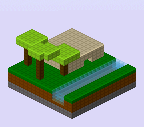

I've been working away at improving the Voxel Editor program and have gotten the next prototype into a tidy enough format to post. It has a proper interface now as well as a much nicer program structure!
Only a short explanation today, as before find the embedded program at the bottom of the post :)
Friday, 19 February 2016
Generic Status Update
This week was busy with things not related to programming projects. So just a little update here to keep to my word of posting weekly.
My idea of creating an image of a Voxel schematic with the information to create it encoded in the image data still needs more work. I think using the alpha transparency channel is messing up the values in the three colour channels per pixel. If I don't make any progress on fixing this soon I'll put the idea on the backburner and refocus on better interface elements. I still feel this is the main programming project I'll work on for a while.
Speaking of other projects, been messing around with an interface for a text adventure. Played in the browser naturally as downloading programs is sooo 2010's :P I have a vague sense that a command line based system of input and output is the simplest and least resource intensive kind of interface a program could have. More complex would be a minimal graphical system, say flat colour squares. Then some kind of 2D render with sprites and finally a full blown 3D render.
I'd like to investigate having a program that allows the simulation/model/state etc. to be visualized in any of the four manners. It would be good to have modular versions of each display method available to plug into any project I decide to tinker with :)
Friday, 12 February 2016
Voxel Editor - Savefile format
Progress is going well on the Voxel Editor I posted a prototype of last week. I have mainly been restructuring the code; as it started off as a little experiment I didn't bother to adhere to an overall structural plan initially, just one huge source file (so many globals D: ). New code base is ordered much nicer with the usual model, control, view split. I will be writing a better user interface for the colour picker as I disliked how each browser I tried the prototype on would create a differently sized range slider.
Feedback from the post on the subreddit VoxelGameDev was good, I'll definitely share this project there again once I get all the interface elements sorted. Inspired by some of the discussion there I've been working on improving the JSON savefile format.
Improving JSON savefile format
Invoking JSON.stringify() on the JavaScript object holding the voxel schematic block data results in a very wasteful representation; the 3D nature of the data is represented by nested arrays:

Feedback from the post on the subreddit VoxelGameDev was good, I'll definitely share this project there again once I get all the interface elements sorted. Inspired by some of the discussion there I've been working on improving the JSON savefile format.
Improving JSON savefile format
Invoking JSON.stringify() on the JavaScript object holding the voxel schematic block data results in a very wasteful representation; the 3D nature of the data is represented by nested arrays:
schematic.block = [ [0,1,0], [0,0,0], [1,0,1]
[1,1,1], [0,1,0], [1,1,1]
[0,1,0], [0,0,0], [1,0,1] ];
When a much more space efficient representation would be to omit the square brackets and note the dimensions elsewhere. Concatenating the block data into a string results in less than half the characters before:
schematic.block = "010000101111010111010000101"
Even better results can be obtained if the block data is compressed. Wanting the JSON savefiles to be human readable I decided run-length encoding would be easy to implement for me or anyone else who wished to parse the savefile:
schematic.runLengthEncodedBlock = "AB4ABA4BABA3BAB4BABA"
With a run of multiples of the same symbol being denoted by a number followed by the symbol.
(A = block 0, B = block 1). The size of the run-length encoded data depends on how varied a voxel schematic is but on average it is a quarter of the concatenated version. A quick check with zip file compression shows that it is *only* half the size of the run-length encoded version, not bad for a compression algorithm that is so easy to implement :D
A picture is worth a thousand words
Having a readable savefile format is great for metadata such as creator, creation date, colour palette and dimensions. It doesn't allow the user to quickly see what the schematic is off though. I have added the option to save the isometric render of the schematic. Which serves not only as a quick preview and easily shared image but also has the data to reconstruct the voxel schematic embedded in it! I believe the game Spore allowed people to share their creatures with such 'encoded' images, shame the game wasn't too compelling. Here's a preview of such an encoded image, can you tell where the schematic data is stored?
Friday, 5 February 2016
Voxel Editor

This week I completed a very neat tool; a browser based voxel editor. This is the first proper programming project post of this year, happily it's a really neat one :)
Click through for an explanation of what the tool does, some example voxel models made with it and finally the running program itself.
Subscribe to:
Posts (Atom)